How to Use Pandas Online: No Installation Required
You want to load a CSV, filter some rows, group by category, and plot the result. The standard path: install Python, create a virtual environment, run pip install pandas matplotlib, open Jupyter. Twenty minutes later you're still fixing a conda conflict.
The shortcut: open pythoncompiler.io in a browser tab. Pandas, NumPy, and Matplotlib are pre-loaded. No installation, no account, no waiting. Your first analysis can be running in under 60 seconds.
This guide walks through the most useful Pandas operations - all with runnable examples you can edit and execute directly on this page.
Create and Explore a DataFrame
A Pandas DataFrame is a table with named columns and a row index. You can build one from a dictionary, a list of dicts, a CSV, or many other sources.
  month region  revenue  units
0   Jan  North    12400    124
1   Feb  South     9800     98
2   Mar  North    15600    156
3   Apr  South    11200    112
4   May  North    18900    189
5   Jun  South    14300    143

Shape: (6, 4)
Columns: ['month', 'region', 'revenue', 'units']

            revenue       units
count      6.000000    6.000000
mean   13700.000000  137.000000
std     3291.200389   32.912004
min     9800.000000   98.000000
25%    11500.000000  115.000000
50%    13350.000000  133.500000
75%    15275.000000  152.750000
max 18900.000000 189.000000Load Data from a CSV
In a real project you'd use pd.read_csv("file.csv"). In the browser, use io.StringIO to wrap an inline CSV string - the same API, perfect for testing and learning.
      product     category  price  stock
0      Laptop  Electronics    999     45
1  Headphones  Electronics     79    312
2        Desk    Furniture    349     28
3       Chair    Furniture    189     74
4    Notebook   Stationery      5    890
5         Pen   Stationery      2   2100

Data types:
product     object
category    object
price        int64
stock        int64
dtype: object
Filter, Sort, and Select
Boolean indexing is the core of Pandas filtering. Pass any True/False condition inside df[...] to select matching rows.
Items over $100:
  product  price
0  Laptop    999
2    Desk    349
3   Chair    189

Affordable electronics:
      product     category  price  stock
1  Headphones  Electronics     79    312

By price (high to low):
  product  price
0  Laptop    999
2    Desk    349
3   Chair    189
GroupBy and Aggregate
groupby splits your DataFrame into groups, lets you apply a function to each, and combines the results. This is the Pandas equivalent of SQL's GROUP BY - and it's one of the most powerful tools in data analysis.
Revenue by region:
region
South    44400
North    37800
West     29300
Name: revenue, dtype: int64

Full summary:
        total_revenue  avg_revenue  total_units  months
region
North           37800      12600.0          378       3
South           44400      14800.0          444       3
West            29300       9767.0          293       3
Merge Two DataFrames
Pandas merge works like a SQL JOIN - combine two DataFrames on a shared key. Supports inner, left, right, and outer joins.
   order_id  customer_id  amount     name    tier
0         1          101     250    Alice    Gold
1         2          102      80      Bob  Silver
2         3          101     175    Alice    Gold
3         4          103     320  Charlie    Gold
4         5          102      95      Bob  Silver

Total spend per customer:
name
Alice      425
Charlie    320
Bob        175
Name: amount, dtype: int64
Visualize with Matplotlib
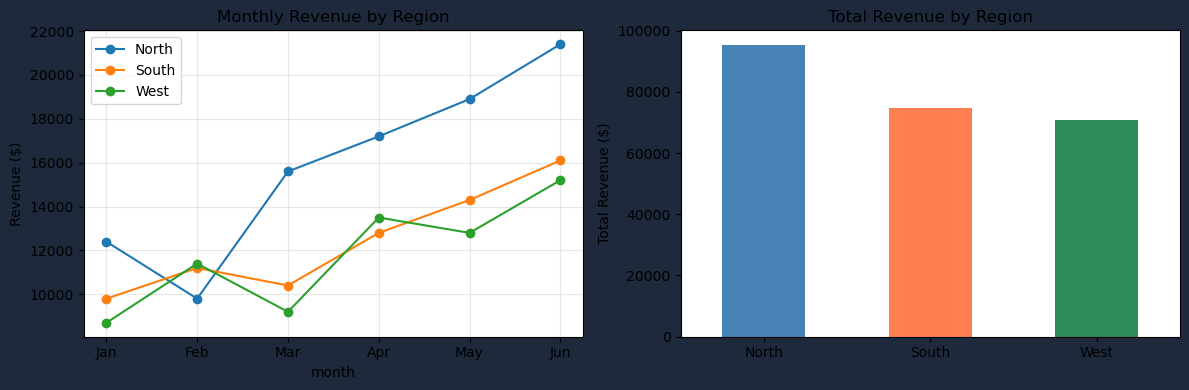
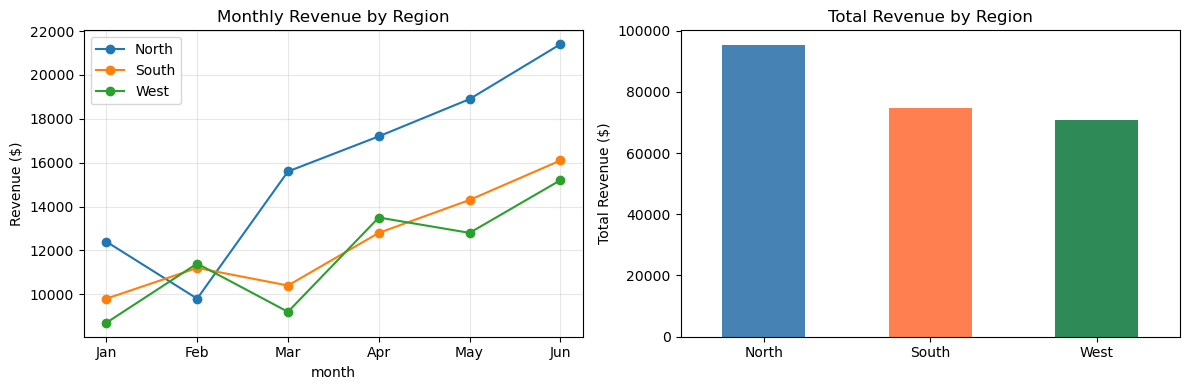
Pandas integrates directly with Matplotlib. Call .plot() on any Series or DataFrame column to create a chart. The plot renders in the output panel below your code.
Install Additional Packages
Pandas, NumPy, and Matplotlib load automatically. For more libraries - scikit-learn, scipy, statsmodels, seaborn - open the Packages panel on the right side of the editor and install them on demand. Everything runs locally in your browser - no server, no rate limits.
R² score: 0.979
Price per sqft: $201
Price per bedroom: $15,751
Predicted price (1200sqft, 3 beds): $283,690
/lib/python3.13/site-packages/sklearn/utils/validation.py:2749: UserWarning: X does not have valid feature names, but LinearRegression was fitted with feature names
  warnings.warn(