Analog Clock in Python Turtle
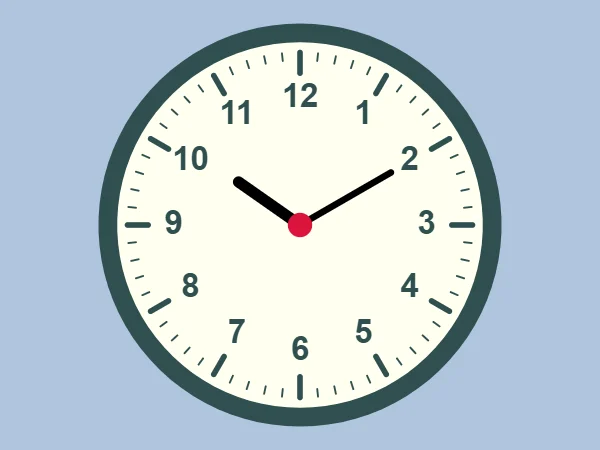
Intermediate · Things to draw · 76 lines · draws in about 10 seconds
Clock angles go clockwise from 12 while turtle headings go anticlockwise from 3, so setheading(90 - angle) turns any clock angle into a turtle heading.
How the code works
Facing a clock angle
Every mark, number and hand starts in the middle of the clock. face_the(0) points the turtle at the 12, face_the(90) at the 3, and so on, because setheading(90 - angle) converts clock angles to turtle headings.
def face_the(angle):
    # Stand in the middle and face a clock angle: 0 is 12 o'clock,
    # and clock angles go clockwise while turtle headings go anticlockwise
    t.penup()
    t.goto(0, 0)
    t.setheading(90 - angle)
Minute marks
One mark every 6 degrees makes 60 marks. minute % 5 == 0 is true at 0, 5, 10 and so on, and those marks are thicker and longer. The turtle moves out with the pen up and draws only the last few steps.
# 60 marks round the edge: a long thick one every 5 minutes
t.pencolor("darkslategray")
for minute in range(60):
    face_the(minute * 6)
    if minute % 5 == 0:
        t.pensize(6)
        t.forward(162)
        t.pendown()
        t.forward(22)
    else:
        t.pensize(2)
        t.forward(176)
        t.pendown()
        t.forward(8)
Numbers
Each number is 30 degrees further round and 135 steps from the middle. write() puts text above the turtle, so it steps down 17 first, and align="center" centres the text from left to right.
# The numbers 1 to 12, one every 30 degrees
for number in range(1, 13):
    face_the(number * 30)
    t.forward(135)
    # write() puts text above the turtle, so step down half its height
    t.sety(t.ycor() - 17)
    t.write(number, align="center", font=("Arial", 26, "bold"))
Hands at 10:10
The minute hand moves 6 degrees per minute. The hour hand moves 30 degrees per hour plus half a degree per minute, so at 10:10 it sits a little past the 10.
# The hands at 10:10
hours = 10
minutes = 10
t.pencolor("black")
face_the(hours * 30 + minutes * 0.5)
t.pendown()
t.pensize(12)
t.forward(80)
face_the(minutes * 6)
t.pendown()
t.pensize(7)
t.forward(112)
Make it yours
Change the code above and press Run. Some ideas:
- Show another time: change
hours = 10andminutes = 10to 3 and 45. - Change
disc(215, "darkslategray")todisc(215, "goldenrod")for a brass frame. - Add a second hand after the minute hand:
face_the(180),t.pendown(),t.pensize(2),t.pencolor("crimson")andt.forward(150).
What it uses
- functions
- for loops with %
- write() for text
- angles and setheading
Every turtle command the site supports is listed on Python turtle online.