Dragon Curve in Python Turtle
Advanced · Fractals · 48 lines · draws in about 15 seconds
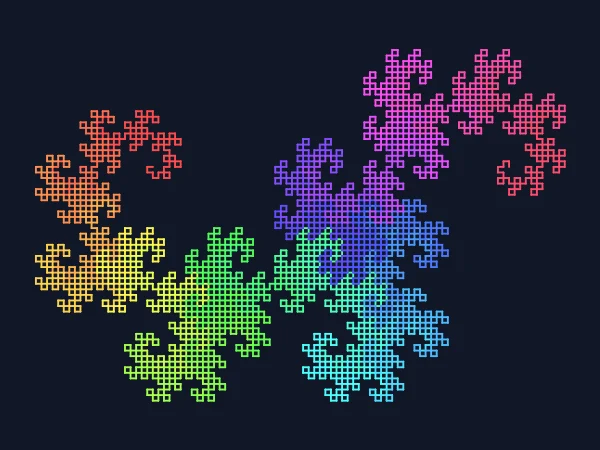
A dragon is two smaller dragons joined at a right angle, the second one folded the other way, and twelve levels of that make 4,096 lines.
How the code works
Drawing thousands of lines quickly
The finished dragon has 4,096 lines and over 12,000 turns. screen.tracer(10) shows them ten at a time so the dragon appears in seconds, and screen.update() at the end shows whatever is left.
# The dragon is 4,096 short lines: tracer(10) shows them 10 at a time,
# so it draws in seconds instead of minutes
screen.tracer(10)
A rainbow along the curve
lines_drawn counts the lines so far, and global lets the function change it. Every 128 lines the colour moves a step round the colour wheel: colorsys.hsv_to_rgb() turns a hue between 0 and 1 into red, green and blue.
global lines_drawn

# Base case: one short line, its colour moving slowly round the rainbow
if depth == 0:
    if lines_drawn % 128 == 0:
        t.pencolor(colorsys.hsv_to_rgb(lines_drawn / 4096, 0.7, 1))
    t.forward(length)
    lines_drawn += 1
    return
Two folded dragons
The function turns 45 degrees one way, draws a smaller dragon, turns 90 degrees the other way, draws another with the sign flipped, and turns 45 degrees back. Dividing the length by the square root of 2 keeps both ends of the dragon in the same place at every depth.
# Recursive case: two smaller dragons joined at a right angle,
# the second one folded the opposite way (a sign of -1 mirrors it)
length = length / math.sqrt(2)
t.right(45 * sign)
dragon(length, depth - 1, 1)
t.left(90 * sign)
dragon(length, depth - 1, -1)
t.right(45 * sign)
Centre the dragon
dragon(380, 12, 1) draws a dragon whose two ends are 380 apart. The curve spreads out above, below and beside that line, so the start point (-157, 62) was chosen to put the finished picture in the middle.
# Start on the left so the finished dragon sits in the middle
t.penup()
t.goto(-157, 62)
t.pendown()
dragon(380, 12, 1)
Make it yours
Change the code above and press Run. Some ideas:
- Change
dragon(380, 12, 1)todragon(380, 6, 1)to see the early shape with 64 lines, then raise the depth one step at a time. - Change the 0.7 in
colorsys.hsv_to_rgb(lines_drawn / 4096, 0.7, 1)to 0.35 for pastel colours. - Replace the
t.pencolor(colorsys.hsv_to_rgb(...))line witht.pencolor("gold")for a one-colour dragon.
What it uses
- recursion
- a global counter
- colorsys for rainbow colours
- tracer for fast drawing
Every turtle command the site supports is listed on Python turtle online.