Extracting Information from Data: Cleaning, Filtering and Metadata
A list of numbers becomes useful when a program turns it into facts you can act on, like which day a snack stand sells out and why. This lesson follows one small project from start to finish: a student council that runs a cold-drink stand at lunch and wants to stop running out. Along the way you will meet the problems every data project has, from messy typing to misleading patterns.
What is the difference between data and information?
Data are raw values: the number of drinks sold each day, typed into a list. Information is the collection of facts and patterns you extract from the data: the average day, the best day, whether sales are rising. Data give you the chance to spot trends, make connections between things, and solve problems, but only once something processes them. Programs are good at that processing, and they turn a long list into a few facts in an instant.
Days recorded: 8
Total cups:    324
Average a day: 40.5
Best day:      61 cups
Worst day:     18 cups
Now the council knows something: some days sell three times as much as others. The list cannot say why. To answer that, they will need more data, and they will need to put it together carefully. First, though, a kind of data that describes other data.
What is metadata?
Metadata are data about data. A song in a music app is the data: the recorded sound. Its title, artist, genre, length and the date you added it are metadata. A text message is data; the time it was sent, who sent it and whether it has been read are metadata.
Metadata do several jobs:
And one important rule: changing or deleting metadata does not change the primary data. Rename a song and it sounds exactly the same.
Search for Neon Owls: ['Night Drive', 'Overclock']
Shortest first: ['Paper Boats', 'Night Drive', 'Overclock', 'Slow Rivers']
Audio unchanged after retagging: True
The search found every song by one artist without opening the audio at all. Search tools like this, from the search bar in a music app to a search engine, are useful because they find information efficiently in collections far too big to look through by hand.
Why does data need cleaning?
The council runs a survey: Which snack should the stand add? The answer box is an open text field, and that causes trouble. Depending on how data were collected, they may not be uniform: when people type freely, each person chooses their own spelling, capitalization and abbreviations.
Every data set brings challenges, whatever its size:
Cleaning data makes it uniform without changing its meaning. "PRETZELS", "pretzels " and "pretzel" all mean the same snack, so cleaning replaces them with one spelling.
Votes: {'pretzels': 4, 'fruit cup': 3, 'chips': 2}
Left out (incomplete or invalid): ['', '12']
Counted exactly as typed, all eleven answers are different, so no snack has more than one vote. After cleaning, pretzels clearly win: the cleaning step is what turned a jumble into an answer. The blank answer and the "12" are set aside instead of being guessed at, because guessing would change what people said.
A sign-up form has an open text box for the city a student lives in. Write clean_city(entry) that makes the entries uniform:
1. Remove spaces at the start and end, and turn any run of spaces inside the name into one space.
2. If the entry (ignoring capitalization) is one of these abbreviations, return the full name: nyc is New York, la is Los Angeles, sf is San Francisco.
3. Otherwise return the name with each word capitalized.
clean_city('  new york ')  ->  'New York'
clean_city('NYC') -> 'New York'Why combine data from different sources?
Often a single source does not contain the data needed to reach a conclusion. The sales log says how many drinks sold, but nothing about the weather. A weather website has each day's high temperature, but nothing about drinks. Combining them, by matching records that share a date, gives the council something neither source has on its own.
Sources rarely line up perfectly. Here the weather site is missing one school day, and it includes a Saturday when the stand was closed.
No temperature for Oct 9, so it is left out
7 days have both sales and weather:
{'date': 'Oct 5', 'cups': 33, 'temp_f': 74}
{'date': 'Oct 6', 'cups': 52, 'temp_f': 85}
{'date': 'Oct 7', 'cups': 18, 'temp_f': 63}
{'date': 'Oct 8', 'cups': 61, 'temp_f': 91}
{'date': 'Oct 12', 'cups': 25, 'temp_f': 68}
{'date': 'Oct 13', 'cups': 57, 'temp_f': 88}
{'date': 'Oct 14', 'cups': 38, 'temp_f': 72}A coding club has two records. sign_ups maps each student's name to their grade, from the sign-up form. attendance maps names to the number of meetings attended, from the teacher's log. Some students signed up and never came; some came but never filled in the form.
Write combine(sign_ups, attendance) that returns a list of (name, grade, meetings) tuples, one for each student who appears in both records, sorted by name.
combine({'Ava': 10, 'Ben': 9}, {'Ben': 4, 'Cy': 2}) -> [('Ben', 9, 4)]How do programs filter, transform and combine data?
A handful of processes do most of the work of extracting or changing information:
The code below runs the first three on the combined days. Turning Fahrenheit into Celsius is also an example of translating data into a form that is easier for some readers to understand.
Hot days: ['Oct 6 (29 °C)', 'Oct 8 (33 °C)', 'Oct 13 (31 °C)']
Average cups on hot days: 56.7
Busiest day: Oct 8 with 61 cups
Write average_on_hot_days(days, threshold). days is a list of dictionaries with the keys "cups" and "temp_f". Return the average number of cups sold on days whose temp_f is at least threshold, rounded to 1 decimal place. If no day is hot enough, return None.
days = [{'cups': 52, 'temp_f': 85}, {'cups': 18, 'temp_f': 63}, {'cups': 61, 'temp_f': 91}]
average_on_hot_days(days, 80) -> 56.5How do patterns emerge from data?
Sorted by date, the sales numbers jump up and down. Transform the same data by sorting it by temperature, and a pattern appears that was there all along. The program below also classifies each day: it puts every day into one of three categories chosen in advance (cool, warm, hot). A related technique, clustering, lets a program find groups of similar items on its own, without being told the groups first, such as students who tend to buy the same snacks. Combining sources, clustering and classifying are all parts of using programs to gain insight from data.
A table like this one is a simple visual tool for communicating what the data show.
date     temp  cups  label
Oct 7      63    18  cool
Oct 12     68    25  cool
Oct 14     72    38  warm
Oct 5      74    33  warm
Oct 6      85    52  hot
Oct 13     88    57  hot
Oct 8      91    61  hot
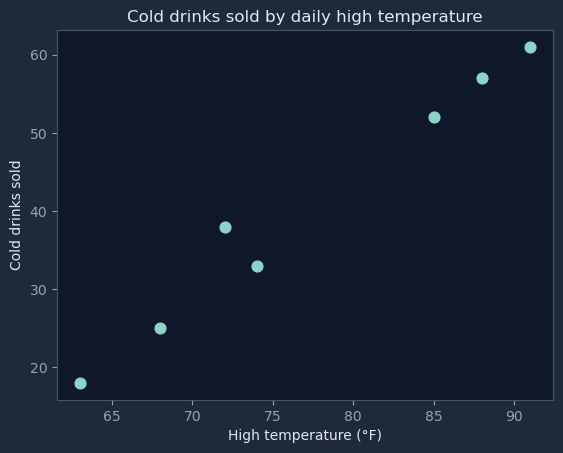
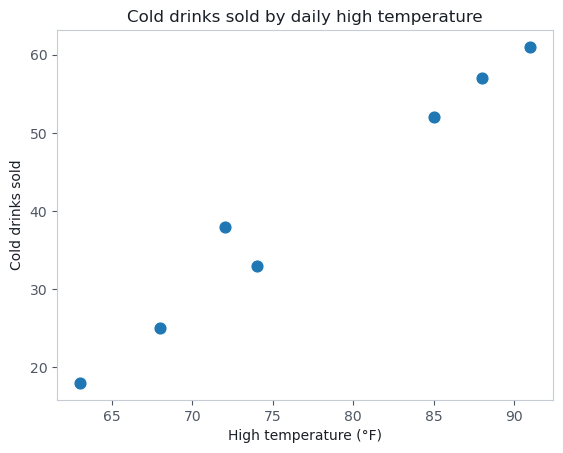
Apart from one small dip between 72 and 74 degrees, the hotter the day, the more drinks sold. Real data are rarely perfectly neat, but the trend is clear. A chart shows the same thing at a glance:
Plotted 7 days
This is how data work usually goes: programs are used in an iterative and interactive way. The first run answered one question and raised the next. Do hot days sell more? led to how many drinks should we stock when the forecast says 85?, which needs another small change to the program and another run. Each loop of asking, changing the program and looking at the result adds a little more knowledge.
Spreadsheet programs do the same kinds of work by point and click: sorting a column, filtering rows, drawing a chart. They are excellent for organizing a data set like this one and finding trends in it. Code earns its place when the steps need repeating every week or the data grow large.
The council can now address its problem: stock extra drinks on days with a hot forecast.
Write count_by_label(temps). It takes a list of daily high temperatures in °F and returns a dictionary counting how many days fall in each category: 'cool' (below 70), 'warm' (70 to 79) and 'hot' (80 or above). Always include all three keys, in the order cool, warm, hot, even when a count is 0.
count_by_label([74, 85, 63]) -> {'cool': 1, 'warm': 1, 'hot': 1}Does a correlation prove that one thing causes another?
Processed data often show a correlation: two things that rise and fall together. The council gets one more source, the school nurse's count of visits each day, and notices something odd. Python's statistics.correlation gives a number from -1 to 1 that measures how closely two lists move together; near 1 means they rise together almost perfectly.
cups and nurse visits:        0.87
temperature and cups:         0.99
temperature and nurse visits: 0.90
Drinks and nurse visits are strongly correlated, but cold drinks are not sending students to the nurse. Hot weather pushes both numbers up: thirsty students buy drinks, and heat gives some students headaches. A correlation found in data does not necessarily mean one thing causes the other. Finding out what is really going on takes more research, such as asking the nurse why students came in, or comparing hot days when the stand was closed.
Can more data fix a biased survey?
Bias in data is often created by the type or the source of the data being collected. Suppose the council wants to know how many hours a week students spend playing video games, and posts the question only in the gaming club's group chat. The answers will be high, because of who saw the question. The simulation below invents a school of 1,000 students and compares surveys of different sizes.
Whole school average:      5.8 hours
Survey of 20 club members: 14.9 hours
Survey of 40 club members: 16.5 hours
Survey of 60 club members: 16.6 hours
Survey of 60 random students: 5.5 hours
Tripling the size of the club survey only moves its answer from about 15 hours to about 17, nearly three times the real average. Bias is not eliminated by collecting more data. It is fixed by changing how the data are collected, for example by choosing students at random from the whole school.
Size still matters in other ways. The size of a data set affects how much information you can extract from it. Seven days of sales can show the heat pattern, but they cannot say whether sales drop in winter; a full school year could.
What limits what you can do with data?
The ability to process data depends on the people and the tools. The council's data fit in a spreadsheet, and anyone on the council can sort a column. A city studying millions of bus card taps a day needs people who can write programs and tools built for that much data.
Large data sets are hard to process on a single computer and may need parallel systems, where many processors or computers each handle part of the data at the same time. Scalability is an important consideration: the computing power and storage of a system decide how much data it can process and store, so a system designed for a school club will struggle when it suddenly has to serve a whole school district.
Check your understanding
A music streaming app stores millions of songs. Which of the following is metadata for a song?
A teacher uploads a video of the science fair. Later, she changes its title and deletes its location tag. Which statement is true?
A study of 200 towns finds that towns with more coffee shops also have more car accidents. Which conclusion is best supported by this finding?
A town wants to know whether residents support building a skate park. It posts an online survey only on a local skate shop's website and gets 3,000 responses, 95% in favor. Which of the following are true? Select two answers.
Select 2 answers.
A form asks students to type the name of their state. Which of the following is an example of cleaning the data?
What is displayed when this code segment runs?
temps ← [72, 85, 90, 64, 88]count ← 0FOR EACH t IN temps{IF(t ≥ 85){count ← count + 1}}DISPLAY(count)
Which of the following best describes what this code segment does?
tempsF ← [50, 68, 86]tempsC ← []FOR EACH f IN tempsF{APPEND(tempsC, (f - 32) * 5 / 9)}
A video service wants to find the most-watched show in each state, using billions of viewing records. The records are too large to process on one computer in a reasonable amount of time. Which approach best addresses this challenge?
Exam topics: 2.3 Extracting Information from Data (DAT-2.A, DAT-2.B, DAT-2.C) and 2.4 Using Programs with Data (DAT-2.D, DAT-2.E)