Spirograph in Python Turtle
Beginner · Patterns and spirals · 20 lines · draws in about 8 seconds
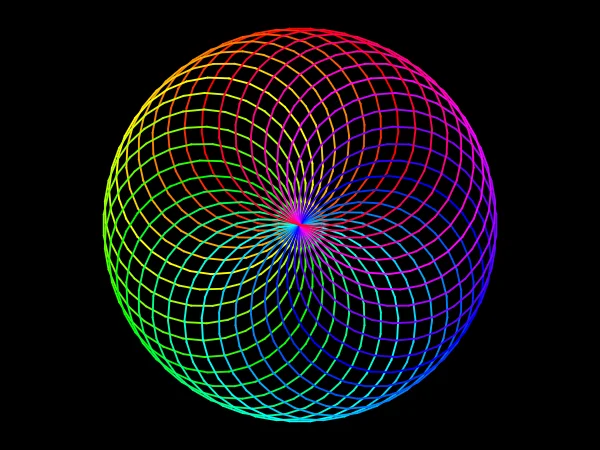
Drawing the same circle 36 times and turning 10 degrees after each one sweeps the circles all the way round into a rainbow spirograph.
import turtle
import colorsys
screen = turtle.Screen()
screen.bgcolor("black")
screen.title("Spirograph")
t = turtle.Turtle()
t.speed(10)
t.pensize(2)
# 36 circles that all pass through the centre, each turned 10 degrees
for i in range(36):
    hue = i / 36
    t.pencolor(colorsys.hsv_to_rgb(hue, 1, 1))
t.circle(105)
t.left(10)
t.hideturtle()
turtle.done()
How the code works
Rainbow colours from a number
hue grows from 0 towards 1 as i counts up. colorsys.hsv_to_rgb(hue, 1, 1) turns it into a bright colour, so the circles run through the rainbow in order.
# 36 circles that all pass through the centre, each turned 10 degrees for i in range(36): hue = i / 36 t.pencolor(colorsys.hsv_to_rgb(hue, 1, 1))
A circle, then a turn
circle(105) draws a circle of radius 105 that starts and ends at the centre of the screen. left(10) turns the turtle, so the next circle sits 10 degrees further round, and 36 turns of 10 degrees make a full turn.
t.circle(105) t.left(10)
Make it yours
Change the code above and press Run. Some ideas:
- Change
range(36)torange(72),i / 36toi / 72andleft(10)toleft(5)for a denser pattern. - Change
t.circle(105)tot.circle(105, steps=6)to draw hexagons instead of circles. - Change
screen.bgcolor("black")toscreen.bgcolor("white")andhsv_to_rgb(hue, 1, 1)tohsv_to_rgb(hue, 1, 0.8)for deeper colours on white.
What it uses
- for loops
- circle
- colorsys for rainbow colours
Every turtle command the site supports is listed on Python turtle online.