Star Pattern in Python Turtle
Intermediate · Patterns and spirals · 37 lines · draws in about 12 seconds
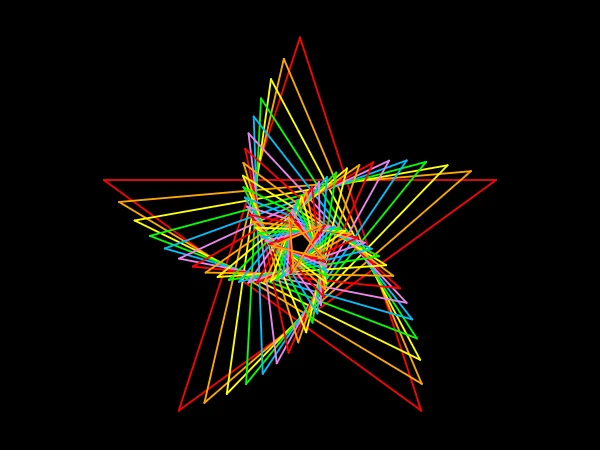
Every star is drawn around the same centre, a little smaller and turned 5 degrees more than the one before, so together they swirl inward.
How the code works
A star around a centre
The turtle goes to the centre, faces 90 + angle and moves out to the top point, where right(162) faces it along the first line. Each line of a five-pointed star is 1.902 times as long as its radius, and a right(144) after each of the five lines brings the turtle back to the top.
def draw_star(radius, angle):
    # A star around (0, -20), with its top point turned by angle.
    # (0, -20) is a little low because a star reaches higher above its centre than below.
    t.penup()
    t.goto(0, -20)
    t.setheading(90 + angle)
    t.forward(radius)          # out to the top point
    t.right(162)               # face along the first line
    t.pendown()
    # Each line is 1.902 times as long as the distance from the centre to a point
    for i in range(5):
        t.forward(radius * 1.902)
        t.right(144)
Smaller and turned
i * 5 turns each star 5 degrees more than the last, and colors[i % 6] gives it the next colour. radius = radius * 0.9 makes the next star 90 percent of the size, so the stars shrink toward the middle.
# 20 stars, each one smaller and turned a little further
radius = 220
for i in range(20):
    t.pencolor(colors[i % 6])
    draw_star(radius, i * 5)
    radius = radius * 0.9
Make it yours
Change the code above and press Run. Some ideas:
- Change
i * 5toi * 12for a looser swirl. - Change
0.9to0.95andrange(20)torange(40)for more stars packed closer together. - Change
colors[i % 6]tocolors[i % 2]so the stars alternate red and orange.
What it uses
Every turtle command the site supports is listed on Python turtle online.