Triangle Spiral in Python Turtle
Beginner · Patterns and spirals · 25 lines · draws in about 14 seconds
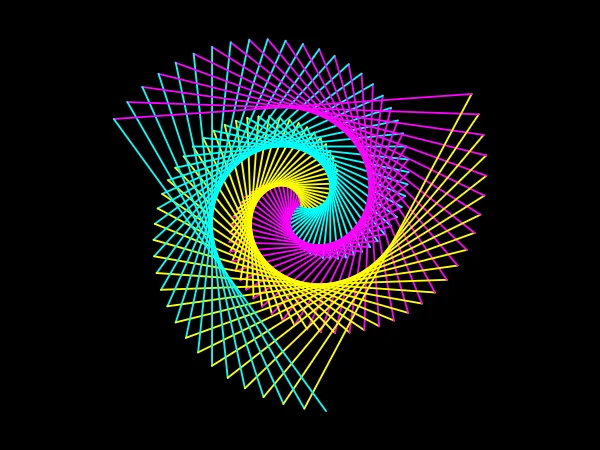
A triangle turns 120 degrees at each corner, and turning 122 instead, with every line a little longer, twists the triangles into a three-armed spiral.
import turtle
screen = turtle.Screen()
screen.bgcolor("black")
screen.title("Triangle spiral")
t = turtle.Turtle()
t.speed(10)
t.pensize(2)
colors = ["magenta", "cyan", "yellow"]

# Start a little higher, so the finished spiral sits in the middle
t.penup()
t.goto(0, 20)
t.pendown()
# A triangle turns 120 degrees at each corner; 122 makes it twist as it grows
for i in range(1, 155):
    t.pencolor(colors[i % 3])
    t.forward(i * 2.5)
    t.left(122)
t.hideturtle()
turtle.done()
How the code works
Three colours and a starting point
One colour for each side of a triangle, so each arm of the spiral keeps its own colour. The turtle starts 20 steps above the centre because the finished spiral reaches a little further down than up.
colors = ["magenta", "cyan", "yellow"] # Start a little higher, so the finished spiral sits in the middle t.penup() t.goto(0, 20) t.pendown()
The twisting loop
i counts from 1 to 154 and each line is i * 2.5 steps long, so every side is longer than the one before. The extra 2 degrees at each corner add up and turn the whole triangle a little further on every lap.
# A triangle turns 120 degrees at each corner; 122 makes it twist as it grows for i in range(1, 155): t.pencolor(colors[i % 3]) t.forward(i * 2.5) t.left(122)
Make it yours
Change the code above and press Run. Some ideas:
- Change
t.left(122)tot.left(120)to see the plain triangle spiral without the twist. - Change
t.left(122)tot.left(125)for a stronger twist. - Add
"lime"to the list and changei % 3toi % 4so the colours wind around the arms.
What it uses
Every turtle command the site supports is listed on Python turtle online.